> For the complete documentation index, see [llms.txt](https://doc.faceplugin.com/llms.txt). Markdown versions of documentation pages are available by appending `.md` to page URLs; this page is available as [Markdown](https://doc.faceplugin.com/face-recognition-sdk/face-recognition-android-sdk.md).
# Face Recognition Android SDK
Faceplugin Face Recognition Android SDK. Fully on-premise face matching, 1:N identify, and 2D liveness. AAR, setActivation, init, faceDetection, VideoWorker.
Fully on-premise **Face Recognition SDK for Android**. Detect faces, extract templates you store yourself, match 1:1 or live 1:N, and check passive 2D liveness on the device. Images never leave the phone.
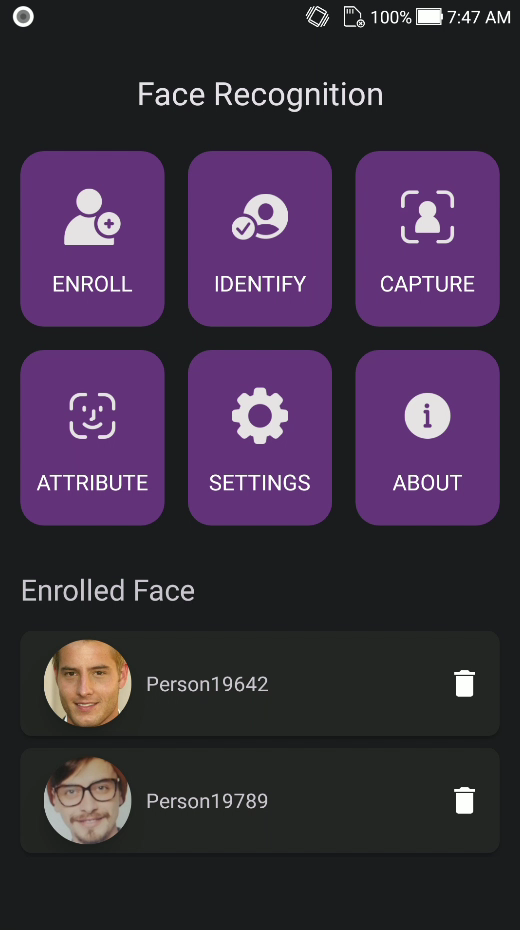
Public class: `com.faceplugin.facerecognitionsdk.FaceRecognitionSDK`. Demo tiles: Enroll, Identify, Capture, Attribute, Settings, About.
### Code
{% embed url="" %}
### Setup
1. Copy the SDK (`libfacesdk` folder) to the `root` folder in your project. Place `facerecognitionsdk.aar` from [Google Drive](https://drive.google.com/drive/folders/1kpzYVv9Gbm_pEpDe9-x7FGB4NWZzvez0) inside `libfacesdk/` (next to `libfacesdk/build.gradle`).
2. Add SDK to the project in `settings.gradle`
```
rootProject.name = "YourProjectName"
include ':app'
include ':libfacesdk'
```
3. Add dependency to your `app/build.gradle`
```
android {
defaultConfig {
minSdk 24
ndk { abiFilters 'arm64-v8a', 'armeabi-v7a' }
}
packaging {
jniLibs { useLegacyPackaging = true }
}
}
dependencies {
implementation project(path: ':libfacesdk')
}
```
4. Add camera / gallery permissions in `AndroidManifest.xml`. Call **setActivation → init** on a **background** thread. Keep the demo package name **`com.faceplugin.facerecognitionsdk`**. Request a new `FP1.…` for your own app.
{% hint style="info" %}
Serialize native calls on one thread. The engine is not concurrent. First `init` unpacks on-device models (a few seconds).
{% endhint %}
Status codes: **0** Success (`SDK_SUCCESS`), **1** Invalid license, **2** Expired, **3** Not activated, **4** Init failed.
### APIs
#### setActivation: This API is used to activate the SDK
```java
public static int setActivation(Context context, String license);
```
| **Input** | - context (Context): Android
Context - license (String): The license string (
FP1.…)
|
| ---------------- | --------------------------------------------------------------------------------------------------------------------------------------------------------------------- |
| **Return value** | The SDK activation status code.
- 0: Success
- 1: Invalid license
- 2: Expired
- 3: Not activated
- 4: Init failed
|
#### init: This API is used to initialize the SDK
```java
public static int init(Context context) throws IOException;
```
| **Input** | - context (Context): Android
Context
|
| ---------------- | ------------------------------------------------------------------------------------------------------------------ |
| **Return value** | The SDK initialization status code.
- 0: Success
- 1–4: see
setActivation
|
#### getMachineCode: This API is used to retrieve the machine code
```java
public static String getMachineCode(Context context);
```
| **Input** | - context (Context): Android
Context
|
| ---------------- | ---------------------------------------------------------------------------------- |
| **Return value** | Machine code string (for license requests). |
#### getLicenseStatus: This API is used to read license status
```java
public static String getLicenseStatus();
public static boolean allowsRecognition();
public static boolean allowsLiveness();
public static String lastLicenseError();
public static boolean isActivated();
```
| **Input** | None |
| ---------------- | ------------------- |
| **Return value** | JSON status string. |
#### faceDetection: This API is used to detect faces
```java
public static List faceDetection(Bitmap bitmap, FaceDetectionParam param);
```
| **Input** | - bitmap (Bitmap): The Bitmap image
- param (FaceDetectionParam): Parameters for face detection
|
| ---------------- | ------------------------------------------------------------------------------------------------------------------------------------------------------------------------ |
| **Return value** | A list of **FaceBox** objects representing the detected faces. |
**FaceDetectionParam**
```java
public class FaceDetectionParam {
public boolean check_liveness = false;
public int check_liveness_level = 0; // 0: High Accuracy, 1: Light
public boolean check_eye_closeness = false;
public boolean check_face_occlusion = false;
public boolean estimate_age_gender = false;
public boolean check_pose = true;
public boolean check_landmarks = true;
public boolean check_quality = false;
public boolean check_emotion = false;
public boolean check_mask = false;
public boolean check_glasses = false;
}
```
Use `FaceDetectionParam.allAttributes()` when you want liveness, age, gender, emotion, and quality in one call.
**FaceBox**
```java
public class FaceBox {
public int x1, y1, x2, y2;
public float yaw, roll, pitch, liveness;
public float face_quality, face_luminance;
public float left_eye_closed, right_eye_closed, face_occlusion, mouth_opened;
public int age, gender, landmarkCount;
public float[] landmarks_68;
public String livenessLabel, genderLabel, emotionLabel, maskLabel;
public String qualityLabel, eyesLeftLabel, eyesRightLabel, rawJson;
}
```
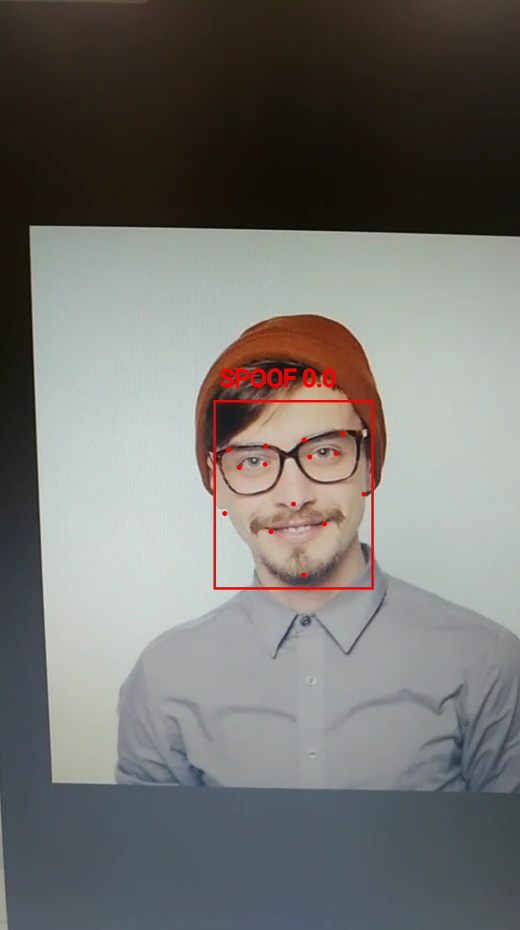
The liveness score ranges from **0.0** to **1.0**. If it is greater than the threshold, it is a real face. Demo default threshold is **0.5**.
#### templateExtraction: This API is used to extract face template
```java
public static byte[] templateExtraction(Bitmap bitmap, FaceBox faceBox);
```
| **Input** | - bitmap (Bitmap): The Bitmap image
- faceBox (FaceBox): The bounding box of the detected face
|
| ---------------- | ----------------------------------------------------------------------------------------------------------------------------------------------------------------------- |
| **Return value** | A byte array representing the extracted template from the face. Store these in **your** database. |
#### similarityCalculation: This API is used to calculate the similarity between two face templates
```java
public static float similarityCalculation(byte[] feature1, byte[] feature2);
```
| **Input** | - feature1 (byte\[]): The first face template
- feature2 (byte\[]): The second face template
|
| ---------------- | ---------------------------------------------------------------------------------------------------------------------------------------------------- |
| **Return value** | A float similarity score. Demo Identify default threshold is **0.67**. |
`similarity(byte[] feature1, byte[] feature2)` is an alias of `similarityCalculation`.
#### detect: This API is used to detect faces and return engine JSON
```java
public static String detect(Bitmap bitmap, boolean crop);
public static String detect(Bitmap bitmap, boolean crop, int flags);
```
| **Input** | - bitmap (Bitmap): The Bitmap image
- crop (boolean): Whether to crop faces
- flags (int): Bit flags (
DETECT\_ALL, DETECT\_LANDMARKS, DETECT\_LIVENESS, DETECT\_LIVENESS\_ACCURATE, …)
|
| ---------------- | ------------------------------------------------------------------------------------------------------------------------------------------------------------------------------------------------------------------------------------------------------------------------------------------------------------------------- |
| **Return value** | JSON string (same idea as HTTP `POST /api/detect`). |
#### quality: This API is used to run face image quality checks
```java
public static String quality(Bitmap bitmap, boolean crop);
```
#### match: This API is used to compare two photos (1:1)
```java
public static String match(Bitmap image1, Bitmap image2, boolean crop);
```
#### extractFeature: This API is used to extract a template from a cropped face image
```java
public static String extractFeature(Bitmap bitmap);
```
Also: `cropFace(Bitmap, FaceBox)`, `parseFeatureBytes(String json)`, `yuv2Bitmap(...)`, `estimatorStatusJSON()`.
#### setLandmarkMode: This API is used to set the landmark model
```java
public static int setLandmarkMode(int mode); // 14, 68, or 468
public static int getLandmarkMode();
```
#### VideoWorker: This API is used for live 1:N identify
Call in this order: `startVideoWorker` → `syncVideoWorkerDatabase(templates)` → `addVideoWorkerFrame` → `stopVideoWorker`. Listen with `setVideoWorkerEventHandler`. Identify in the demo is **passive 2D** liveness plus VideoWorker.
```java
FaceRecognitionSDK.startVideoWorker(config);
FaceRecognitionSDK.syncVideoWorkerDatabase(templates, 0.67f);
FaceRecognitionSDK.addVideoWorkerFrame(bitmap);
FaceRecognitionSDK.stopVideoWorker();
```
Also: `startVideoWorker(float matchThreshold)`, `addVideoWorkerFrameRgb`, `addVideoWorkerFrameBgra`, `VideoWorkerConfig` / `ActiveLivenessConfig`.
| **Input** | Match threshold, enrolled templates, and camera frames. |
| ---------------- | ------------------------------------------------------- |
| **Return value** | Match events via the VideoWorker listener (JSON). |
#### deinit: This API is used to unload the engine
```java
public static int deinit();
```
| **Input** | None |
| ---------------- | ---------------------------- |
| **Return value** | Status code. **0**: Success. |
### Run the demo
1. Place `facerecognitionsdk.aar` in `libfacesdk/` (see Setup).
2. Open the cloned repo in Android Studio.
3. Run on a **physical** phone (emulator is not recommended for camera / liveness).
4. Wait until the home status bar disappears. Then **Enroll / Identify / Capture / Attribute** unlock.
Keep the demo package name **`com.faceplugin.facerecognitionsdk`** so the sample key works.
| Demo tile | What it does |
| ------------- | ----------------------------------------------------------------------------------- |
| **Enroll** | Enroll a person from a gallery photo (exactly one face) into the on-device database |
| **Identify** | Live 1:N camera match (stop on first hit) with 2D liveness |
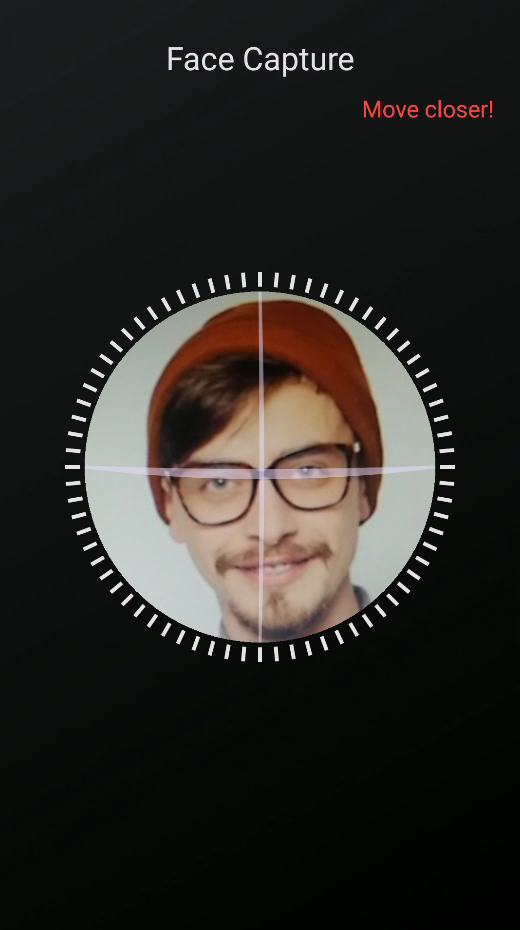
| **Capture** | Oval coach capture → still with attributes → optional enroll |
| **Attribute** | Gallery analysis: landmarks, liveness, pose, quality, age, gender, emotion |
| **Settings** | Camera lens, identify / liveness / pose / eye-close thresholds |
| **About** | SDK name and license label |
### Screenshots
| Home | Identify | Capture |
| ----------------------------------------------------------------------------------------------------------------------------------------------------------------------------------------------------- | ---------------------------------------------------------------------------------------------------------------------------------------------------------------------------------------------------------- | -------------------------------------------------------------------------------------------------------------------------------------------------------------------------------------------------------- |
|  |
|  |
|  |
### System requirements
| Item | Minimum | Recommended |
| ------- | -------------------------- | -------------------- |
| Android | API 24 (7.0) | API 29 (10) or newer |
| ABI | `arm64-v8a`, `armeabi-v7a` | `arm64-v8a` |
| RAM | 4 GB | 6 GB or more |
| Camera | Front camera | 720p or 1080p |
| Device | Physical device | Same |
### License
Licenses are **offline**. Keep the demo package name so the sample key works. For your own app, [request a license](/request-a-license-and-support.md).
### Try it (after the demo compiles)
```kotlin
Thread {
FaceRecognitionSDK.getMachineCode(context)
var code = FaceRecognitionSDK.setActivation(context, DEMO_LICENSE)
if (code == FaceRecognitionSDK.SDK_SUCCESS) {
code = FaceRecognitionSDK.init(context)
}
val faces = FaceRecognitionSDK.faceDetection(bitmap, FaceDetectionParam())
if (faces.isNotEmpty()) {
val t = FaceRecognitionSDK.templateExtraction(bitmap, faces[0])
val score = FaceRecognitionSDK.similarityCalculation(t, t)
}
}.start()
```
{% hint style="warning" %}
Call `setActivation`, `init`, and all process methods **off the UI thread**. The engine is **not** concurrent — serialize calls on one thread.
{% endhint %}
### Integrate into your own app
You need `libfacesdk/` (the AAR) and `FaceRecognitionSDK`. You do **not** need the demo Activities.
1. Copy `libfacesdk` into your project root and put `facerecognitionsdk.aar` inside it.
2. Wire Gradle as in Setup (`minSdk 24`, `abiFilters`, `useLegacyPackaging`).
3. Add CAMERA and photo-library permissions.
4. Request `FP1.…` for your own app.
5. Optional: copy `app/.../kit/` (`FaceRecognitionClient`) so you do not rewrite threading, CameraX, or VideoWorker.
Typical call order: `setActivation` → `init` → `faceDetection` → `templateExtraction` → store templates in **your** database → `similarityCalculation` or VideoWorker for live 1:N.
[Request a License & Support](/request-a-license-and-support.md) · [Contact US](/contact-us.md)
---
# Agent Instructions
This documentation is published with GitBook. GitBook is the documentation platform designed so that both humans and AI agents can read, navigate, and reason over technical content effectively. Learn more at gitbook.com.
## Querying This Documentation
If you need additional information that is not directly available in this page, you can query the documentation dynamically by asking a question.
Perform an HTTP GET request on the current page URL with the `ask` query parameter, and the optional `goal` query parameter:
```
GET https://doc.faceplugin.com/face-recognition-sdk/face-recognition-android-sdk.md?ask=&goal=
```
`ask` is the immediate question: it should be specific, self-contained, and written in natural language.
`goal` is optional and describes the broader end goal you are ultimately trying to accomplish on behalf of the user. GitBook uses it to tailor the answer towards what is most useful for that goal.
The response will contain a direct answer to the question and relevant excerpts and sources from the documentation.
Use this mechanism when the answer is not explicitly present in the current page, you need clarification or additional context, or you want to retrieve related documentation sections.
|
### System requirements
| Item | Minimum | Recommended |
| ------- | -------------------------- | -------------------- |
| Android | API 24 (7.0) | API 29 (10) or newer |
| ABI | `arm64-v8a`, `armeabi-v7a` | `arm64-v8a` |
| RAM | 4 GB | 6 GB or more |
| Camera | Front camera | 720p or 1080p |
| Device | Physical device | Same |
### License
Licenses are **offline**. Keep the demo package name so the sample key works. For your own app, [request a license](/request-a-license-and-support.md).
### Try it (after the demo compiles)
```kotlin
Thread {
FaceRecognitionSDK.getMachineCode(context)
var code = FaceRecognitionSDK.setActivation(context, DEMO_LICENSE)
if (code == FaceRecognitionSDK.SDK_SUCCESS) {
code = FaceRecognitionSDK.init(context)
}
val faces = FaceRecognitionSDK.faceDetection(bitmap, FaceDetectionParam())
if (faces.isNotEmpty()) {
val t = FaceRecognitionSDK.templateExtraction(bitmap, faces[0])
val score = FaceRecognitionSDK.similarityCalculation(t, t)
}
}.start()
```
{% hint style="warning" %}
Call `setActivation`, `init`, and all process methods **off the UI thread**. The engine is **not** concurrent — serialize calls on one thread.
{% endhint %}
### Integrate into your own app
You need `libfacesdk/` (the AAR) and `FaceRecognitionSDK`. You do **not** need the demo Activities.
1. Copy `libfacesdk` into your project root and put `facerecognitionsdk.aar` inside it.
2. Wire Gradle as in Setup (`minSdk 24`, `abiFilters`, `useLegacyPackaging`).
3. Add CAMERA and photo-library permissions.
4. Request `FP1.…` for your own app.
5. Optional: copy `app/.../kit/` (`FaceRecognitionClient`) so you do not rewrite threading, CameraX, or VideoWorker.
Typical call order: `setActivation` → `init` → `faceDetection` → `templateExtraction` → store templates in **your** database → `similarityCalculation` or VideoWorker for live 1:N.
[Request a License & Support](/request-a-license-and-support.md) · [Contact US](/contact-us.md)
---
# Agent Instructions
This documentation is published with GitBook. GitBook is the documentation platform designed so that both humans and AI agents can read, navigate, and reason over technical content effectively. Learn more at gitbook.com.
## Querying This Documentation
If you need additional information that is not directly available in this page, you can query the documentation dynamically by asking a question.
Perform an HTTP GET request on the current page URL with the `ask` query parameter, and the optional `goal` query parameter:
```
GET https://doc.faceplugin.com/face-recognition-sdk/face-recognition-android-sdk.md?ask=&goal=
```
`ask` is the immediate question: it should be specific, self-contained, and written in natural language.
`goal` is optional and describes the broader end goal you are ultimately trying to accomplish on behalf of the user. GitBook uses it to tailor the answer towards what is most useful for that goal.
The response will contain a direct answer to the question and relevant excerpts and sources from the documentation.
Use this mechanism when the answer is not explicitly present in the current page, you need clarification or additional context, or you want to retrieve related documentation sections.